AI Video Generator

Kling 3.0 Omni

Create controlled AI videos with Kling 3.0 Omni using multimodal references, consistent characters, multi-shot storyboards, and native audio.

Four core capabilities of Kling 3.0 Omni

Create longer, more coherent audiovisual stories with native sound, shot-level direction, and motion that respects the scene.

OMNI NATIVE AUDIO

Sound and picture, generated in sync

  • Generate native dialogue with the picture, without dubbing later
  • Match sound effects and ambience naturally to action and setting
  • Keep character voices consistent across languages and regional accents
  • Hold picture, motion, and sound in rhythm from start to finish

MULTI-SHOT STORYBOARDING

One generation, a complete sequence

  • Direct up to six shots in a single generation
  • Set shot size, perspective, and action for every segment
  • Control push, pull, pan, tilt, and tracking camera moves
  • Connect transitions, coverage, and story rhythm naturally

PHYSICS-AWARE MOTION

Motion that feels grounded in reality

  • Give cloth, hair, and fluids natural dynamic behavior
  • Make weight, inertia, and speed respond more believably
  • Keep contact, collision, and force relationships credible
  • Maintain subject and scene consistency through complex action

15-SECOND GENERATION

Longer shots, more complete stories

  • Generate up to 15 seconds in a single run
  • Build more complete, continuous extended takes
  • Let multi-stage action unfold naturally
  • Keep subjects, scenes, motion, and sound coherent throughout

Kling 3.0 Omni showcase

Explore cinematic character performance, macro nature, stylized action, and native audio at a larger scale.

Seaside sunset dialogue

From input to finished video in three steps

Lock the character and visual direction with a reference, describe picture and sound, then generate and refine.

Reference
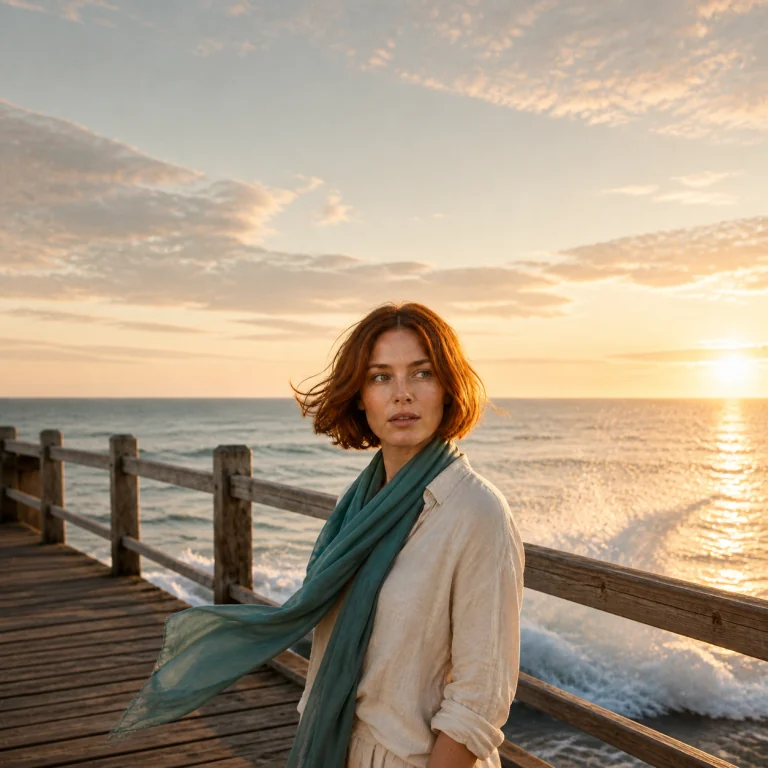
Character reference of a red-haired woman at a sunset beach
Add reference media

Step 1: Add reference media

Upload a character or setting reference to lock the face, hair, wardrobe, key props, and color direction.

Sunset beach pier, slow medium push-in. Wind moves her hair and scarf; she hears a call and turns. Keep the character and wardrobe consistent, with natural waves and wind.

Step 2: Write your prompt

Structure the scene, camera, action, environmental motion, sound, and elements that must stay fixed.

Completed frame of the same character turning on a beach pier

Step 3: Generate and refine

Choose format and duration, then refine performance, sound, and shot continuity through extensions or edits.

Choose the right Kling video workflow

Kling 3.0 Omni is the most complete reference-led workflow. Other Kling models remain useful when a task needs a narrower generation path.

Model
Kling 3.0 OmniRecommended model
Kling 3.0
Kling O1
Kling 2.6
PositioningAll-in-one multimodal generation, reference control, editing, native audio, and storyboarding.General 3.0 video generation with native audio and multi-shot narrative control.Reference-oriented generation and editing from the earlier Omni workflow.An earlier generation option retained for compatible workflows.
Best forCharacter-led campaigns, multi-shot narratives, reference recreation, and complex audiovisual direction.Text-to-video and image-to-video projects that do not need the full Omni reference workflow.Focused reference transfer and compatible editing tasks.Existing projects that depend on the earlier model behavior or cost profile.

Turn references into a directed video sequence

Start with a prompt, then continue in the PixPix workbench with Kling 3.0 Omni and the reference materials your scene needs.

Choose your plan

Get more generations and early access to new creative features from PixPix.

Loading plans…

Kling 3.0 Omni questions

Practical answers about capabilities, references, duration, audio, model differences, and usage.

Kling 3.0 Omni is a multimodal AI video model that combines text, image, video, and audio references with generation, editing, native audio, and multi-shot storyboard control.