MiniMax H3 vs Seedance 2.5: A Comparison of Virtual Vlogger Outfit-Change Video Effects
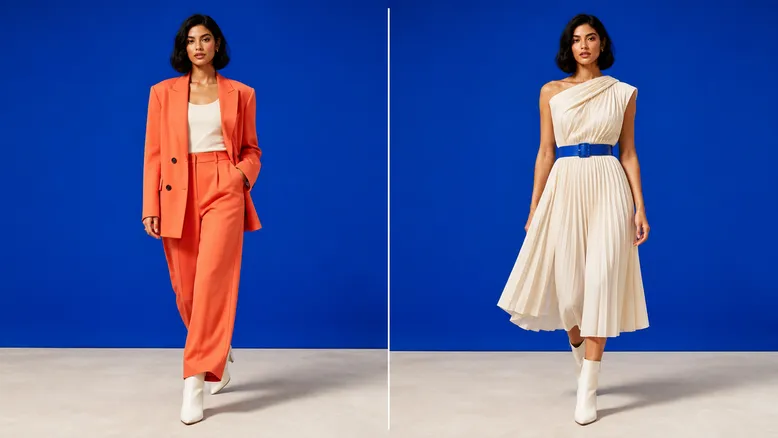
MiniMax H3 | Seedance 2.5 |
|---|---|
Virtual blogger outfit‑change videos combine character generation, fashion showcases, clothing transformations, and the fast‑paced rhythm of social media short videos—making them a genre that rigorously tests an AI video model’s ability to maintain character consistency and seamless transitions.
The model must not only preserve the virtual blogger’s facial features, hairstyle, and body shape but also accurately swap outfits during motion, ensuring that the new look’s fabrics, cuts, accessories, and surroundings remain harmonious with the scene.
This time, using the same set of prompts, we generated virtual blogger outfit‑change videos with MiniMax H3 and Seedance 2.5, focusing on comparing each model’s strengths and characteristics in terms of character consistency, outfit fidelity, transition smoothness, body movement, material rendering, and overall appeal for social media sharing.
Key Focus of This Test
For virtual blogger outfit‑change videos, we primarily evaluated the following aspects:
Comparison Dimensions | Observation Points |
|---|---|
Character Consistency | Whether facial features, hairstyle, age, and body type remain stable before and after the outfit change |
Outfit Accuracy | Whether style, color, cut, and coordination align with the prompt |
Material Rendering | Whether denim, knitwear, leather, silk, and other fabrics are rendered clearly |
Outfit Transition | Whether the clothing changes appear natural, clean, and easy to follow |
Body Stability | Whether limbs, shoulders, neck, and torso deform during outfit changes |
Movement Coherence | Whether turns, raised arms, jumps, and poses flow naturally and connect smoothly |
Scene Consistency | Whether background, lighting, camera angles, and character positioning remain stable |
Blogger Expressiveness | Whether expressions, postures, and interactions with the camera convey a strong social‑media vibe |
Final Video Rhythm | Whether multiple outfit sequences form a clear, fluid presentation order |
Features and Advantages of MiniMax H3
For virtual blogger outfit‑change videos, the most notable advantage of MiniMax H3 is its ability to enhance the aesthetic appeal of the character, the texture of the clothing, and the visual impact of key transition moments.
A More Attractive Virtual Blogger Image
Creating an outfit‑change video begins with establishing a distinctive virtual blogger persona.
MiniMax H3 makes it easier to highlight:
exquisite facial features and makeup;
a highly fashionable hairstyle;
clearly defined body contours;
confident, natural expressions in front of the camera;
an overall vibe that closely resembles that of a fashion influencer or commercial model;
key poses suitable for social media cover images.
When the focus is on the character’s beauty, styling, and a fashionable atmosphere, MiniMax H3 can more easily produce visuals that grab attention at first glance.
Clothing Materials and Styling Details Stand Out Even More
MiniMax H3 excels at emphasizing material contrasts between different outfits, such as:
the texture and stitching of denim fabric;
the soft, supple feel of knitted garments;
the reflective sheen and structured design of leather pieces;
the high‑gloss finish of silk, satin, and sequins;
the shoulder lines and tailored cuts of suits;
the graceful folds and flowing drape of skirts;
metallic accessories like jewelry, belts, and bags.
This meticulous treatment of materials helps create more pronounced visual distinctions with each outfit change.
Greater Visual Impact During Outfit Changes
Social media outfit‑change videos often rely on gestures like turning, blocking, waving, or jumping to showcase new looks.
MiniMax H3 makes it easier to emphasize pivotal moments during these transitions, such as:
a new look emerging after the character turns;
completing an outfit change while a hand covers the camera;
clothes rapidly shifting under lighting effects;
switching outfits as the camera zooms in;
changing clothes upon landing after a jump;
Fabric or particles swirl around the character to complete the transformation.
This type of visual is well-suited for creating eye-catching transitions and impactful social media content.
Each outfit has a high level of polish.
MiniMax H3 excels at turning every ensemble into a cohesive, fashion-forward scene. The character, clothing, pose, lighting, and background typically form a clear visual hierarchy.
It’s particularly suitable for:
Virtual blogger outfit showcases;
Fashion brand concept videos;
Clothing “must‑have” short clips;
Multi‑style outfit transitions;
Social media cover images and key frames;
Content emphasizing makeup, clothing, and accessories.
Things to watch out for with MiniMax H3
MiniMax H3 places greater emphasis on the visual impact of both the character and their attire, so during rapid, consecutive outfit changes, it’s crucial to verify that the identity and garment structure remain stable.
Key checks include:
Whether the character’s face changes after an outfit switch;
Whether hairstyles or makeup unexpectedly shift;
Whether collars, cuffs, or waistlines become distorted;
Whether garments stick to skin or backgrounds;
Whether accessories suddenly appear or disappear;
Whether fingers look unusual when hands obscure the camera;
Whether body proportions change after a turn;
Whether the same person remains recognizable after multiple outfit changes.
Features and advantages of Seedance 2.5
In virtual blogger outfit‑change videos, Seedance 2.5’s standout strengths lie in its ability to enhance the readability of motion transitions, outfit changes, and seamless continuous displays. motion transitions, outfit changes, and continuous display readability
Outfit changes are much clearer.
Outfit‑change videos must help viewers understand exactly which movements trigger each costume transition.
Seedance 2.5 is especially suited for showcasing:
The character assuming their initial pose;
Raising a hand, turning, or moving closer to the camera;
Creating natural occlusions through movement;
The clothing completes its transformation while remaining concealed;
The character maintains their original direction of motion;
The pose is frozen or the next action begins with the new look.
This process is clear and helps reduce abrupt jumps in outfit‑change videos.
The character’s body movement appears more continuous.
Seedance 2.5 places greater emphasis on the relationship between the body before and after an action, making it ideal for handling:
The character turns in place;
Walking forward toward the camera;
Turning sideways to showcase the outfit;
Raising a hand to adjust hair;
Gently supporting a bag or collar;
Transitioning from one pose to another;
Continuing the same action after changing outfits.
For videos requiring multiple consecutive outfit changes, smooth transitions help maintain the character’s identity and pacing.
The sequence of multiple outfit displays becomes easier to follow.
Virtual blogger outfit‑change videos typically feature several distinct looks, such as casual, work‑appropriate, party, street‑style, or vacation attire.
Seedance 2.5 is particularly well suited to presenting these different styles in a clearly defined order:
Everyday basic outfit;
Work‑or formal attire;
Street‑style trendiness;
Evening or party wear;
Concluding with the featured main look.
This structure closely resembles a complete outfit collection or Lookbook video.
The scene and character positioning remain more stable.
Outfit‑change videos usually employ relatively fixed camera angles and backgrounds, allowing viewers to focus entirely on the clothing transformations.
Seedance 2.5 excels at maintaining:
Character standing position;
Shot composition;
Background layout;
Relationship between the floor and feet;
Direction of movement before and after outfit changes;
.Spatial continuity between multiple outfit sets.
Points to note for Seedance 2.5
Seedance 2.5 places greater emphasis on motion and the outfit-changing process, so it may be relatively restrained in terms of character close-ups, clothing textures, and the visual impact of individual outfits.
Key checks include:
Is the character’s facial expression sufficiently refined?
Does each outfit exhibit clear distinctions?
Have fabric textures been simplified?
Is the outfit-changing process clear yet lacking a sense of surprise?
Are character poses too repetitive?
Are the accessories for new outfits complete?
Are key still frames suitable enough to serve as cover images?
Core differences between the two models
Comparison Dimensions | MiniMax H3 | Seedance 2.5 |
|---|---|---|
Virtual blogger image | More prominent facial features, makeup, and an idol-like aesthetic | Greater emphasis on maintaining stability during movement |
Clothing materials | More distinct details in fabrics, tailoring, and accessories | Clothing primarily serves the continuous outfit-changing process |
Outfit-changing effects | Key moments and visual effects carry stronger impact | Motion occlusion and outfit-transition transitions are clearer |
Character movements | Simple posing works well; complex motions require review | Turns, arm lifts, and displacements are smoother and more coherent |
Multiple outfit sets | Individual outfit completion is higher | The presentation order of multiple outfit sets is clearer |
Scene stability | Emphasizes fashion atmosphere and visual layering | Fixed camera angles and character positioning are more stable |
Single-frame presentation | Suitable for covers, posters, and styling freeze frames | Places greater emphasis on the continuity of the entire video segment |
Applicable scenarios | Fashion visuals, brand concepts, and transformation effects | Outfit collections, lookbooks, and sequential outfit changes |
This test’s prompt
For this comparison, we used the same set of prompts to generate videos with MiniMax H3 and Seedance 2.5, minimizing the impact of prompt variations on the final results.
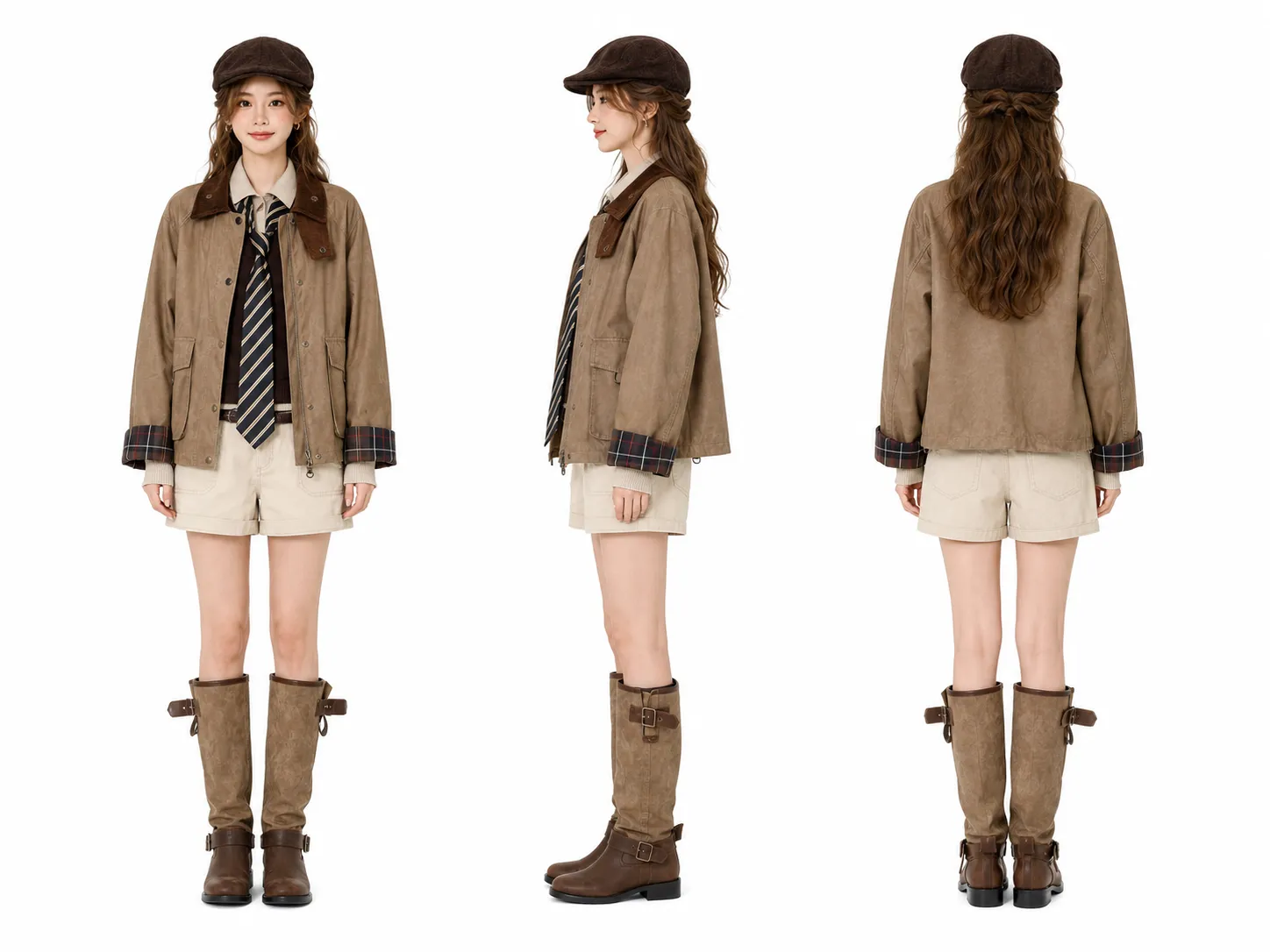
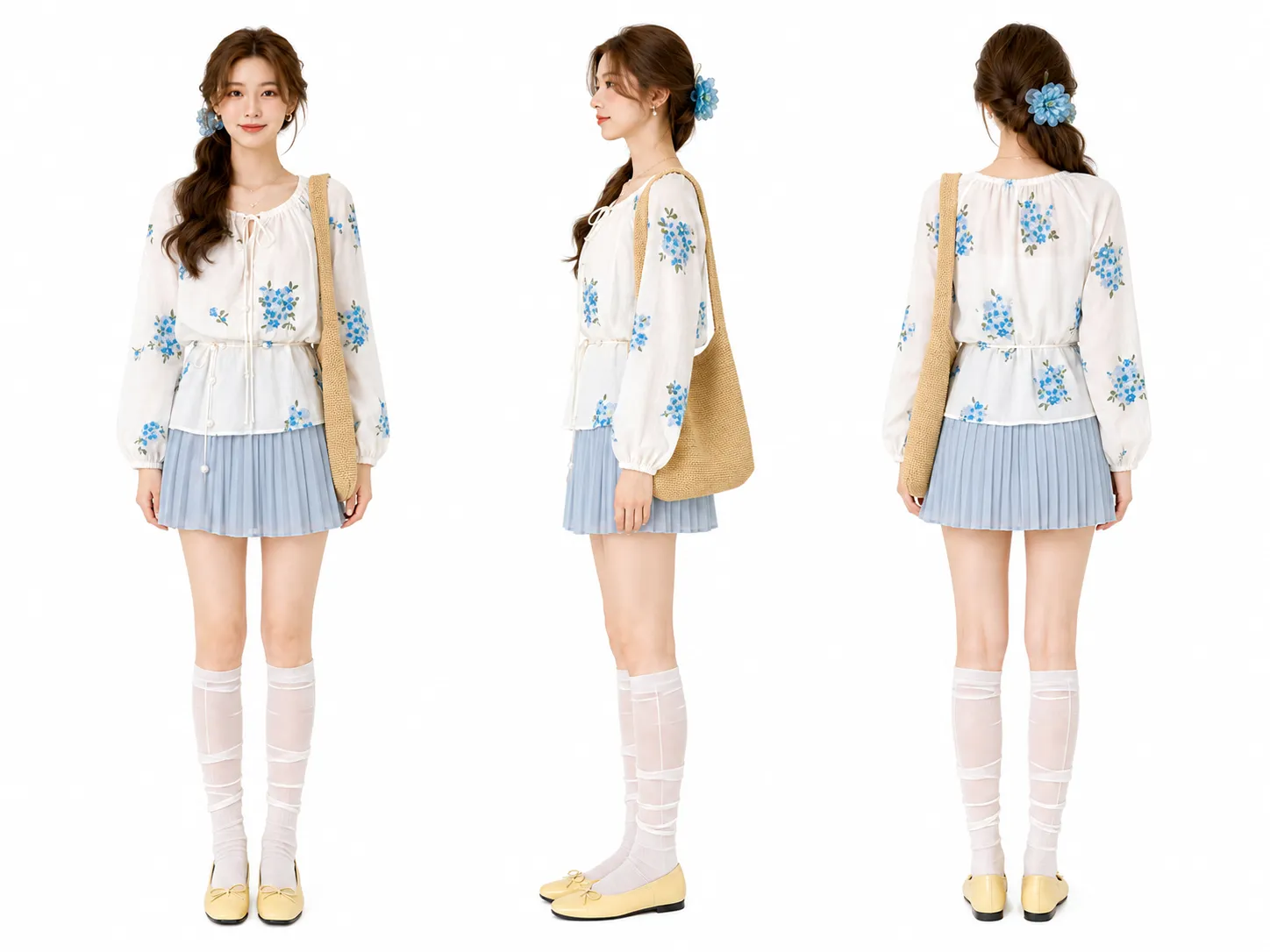
Using five reference images as precise styling references for the same woman, generate a 10-second solo full-body outfit‑change video in the order of uploads: Image 1 → Image 2 → Image 3 → Image 4 → Image 5.
The scene features only one young East Asian woman, standing centrally against a seamless white studio backdrop. The camera remains fixed, capturing a frontal, eye-level, full-body shot with the subject fully visible from head to toe. The lighting is bright and clean, using soft, even commercial studio lighting. Throughout the entire sequence, the camera must not move, rotate, zoom in, or zoom out.
Outfit‑change rules: For each look, begin with a brief, natural, and relaxed introductory gesture; once the gesture concludes, let both arms return to a comfortable position. Then, pivoting around the body’s vertical axis, keep both feet firmly planted and rotate continuously 360 degrees to the right. At the moment the subject reaches 180 degrees—when her back faces the camera—use two frames of natural motion blur to instantly switch her clothing, shoes, hairstyle, hat, and accessories to match the next reference image. Continue rotating at the same speed and direction for the remaining 180 degrees, returning to face the camera directly. The rotation must proceed without pauses, reversals, or changes in direction.
0–0.7 seconds: First look. The subject gazes gently at the camera with a warm smile, tilts her head slightly, and uses one hand to casually adjust the hem of her cardigan before relaxing her arm.
0.7–2.1 seconds: The subject rotates continuously 360 degrees to the right; upon reaching 180 degrees, she instantly transitions from the first look to the second, then completes the rotation back to face forward.
2.1–2.6 seconds: Second look. She lightly holds the strap of her woven bag, shoulders relaxed, eyes bright, and wearing a fresh, cheerful smile.
2.6–4.0 seconds: Rotates 360 degrees to the right; at 180 degrees, she switches from the second look to the third, continuing the rotation back to face forward.
4.0–4.5 seconds: Third look. She naturally raises her hand to gently adjust the brim of her newsboy cap, nods slightly, and maintains a composed, confident smile.
4.5–5.9 seconds: Rotates 360 degrees to the right; at 180 degrees, she transitions from the third look to the fourth, completing the rotation back to face forward.
5.9–6.4 seconds: Fourth look. She lightly touches the clasp of her trench coat, naturally shifts her center of gravity, and projects an effortless, crisp sense of movement.
6.4–7.8 seconds: Rotates 360 degrees to the right; at 180 degrees, she switches from the fourth look to the fifth, finishing the rotation back to face forward.
7.8–10 seconds: Fifth look. One hand rests naturally on the strap of her shoulder bag, while the other gently adjusts her red knitted vest. She slightly tilts her head, offering a lively, natural smile toward the camera, concluding with an elegant, steady frontal pose.
All movements and expressions must appear natural and fluid. During rotation, the head, shoulders, torso, and legs should turn in coordinated harmony—not just the head or a twisted waist. Both feet remain stationary, pivoting naturally around the balls of the feet without stepping or lateral sliding. Hair, skirt hems, ties, pant legs, and bag straps exhibit subtle, realistic inertia but avoid exaggerated flailing. Shoulder bags and ID cards may sway slightly with the rotation, yet they must not detach, disappear, or pass through the body.
Background music consists of upbeat, fashionable pop tracks without lyrics, around 125 BPM, featuring crisp drum beats, handclap rhythms, bright synthesizers, and smooth basslines. A gentle, rapid whoosh sound accompanies each rotation start; a crisp click signal marks the completion of the outfit change at 180 degrees; and a subtle rhythmic accent underscores the return to facing forward. The final pose concludes with a bright, short tone. No dialogue or narration is included.
Avoid: the presence of a second person, face-swapping, age or body‑shape changes, movement of the subject’s position, foot slippage, incorrect rotation direction, insufficient or excessive rotations, premature outfit changes, gradual outfit transitions, melting clothing, clothing penetrating through the body, accessories floating inexplicably, broken bag straps, flashing hats, distorted limbs, extra fingers, stiff movements, sudden stops, camera movement, frame scaling, background changes, low resolution, flickering, or frame drops.
Test summary
For short-form content like virtual blogger outfit transformations, MiniMax H3 and Seedance 2.5 demonstrate distinct creative focuses.
MiniMax H3 excels at virtual blogger styling, fabric textures, close-up shots of characters, and visually striking outfit transformations, making it ideal for creating fashion-forward, meticulously styled single-look content that closely resembles brand advertising.
Seedance 2.5 is better at capturing body movements, seamless outfit transitions, character posing, and continuous showcases of multiple outfits, making it well-suited for producing content with clear transitions, a cohesive rhythm, and a style reminiscent of a virtual blogger’s lookbook.
If you want viewers to be first captivated by the characters and their attire, prioritize MiniMax H3; if you aim for an uninterrupted viewing experience showcasing multiple outfit changes, Seedance 2.5 may be the better choice.

AI Image Tool Built for E-commerce Teams
For new product launches, advertising, and promotional campaigns, use AI to generate product images, scene visuals, ad creatives, and short video assets — making content production faster.