How to create an Etsy digital decorative art mockup? Frame proportions, wall dimensions, and download instructions.
A buyer sees a decorative painting on Etsy, framed in oak and hung above the sofa, but upon clicking into the product page still asks, “Will the frame be shipped with it?” This isn’t because the buyer didn’t read carefully. The main image shows the room quite comprehensively, yet it fails to make clear at a glance that what’s being sold is a digital file—the wall, frame, and furniture are merely props used in the mockup.
Images for digital art prints should simultaneously convey three key points: what files the buyer will receive after downloading, which aspect ratios the artwork supports, and roughly how the piece will look when displayed on the wall at different sizes. Interior scenes help visualize the final result but cannot replace a detailed file list or size chart.
I. How to Avoid Misleading Buyers About Digital Art Prints on Etsy
The main image should first establish the artwork as the visual centerpiece while still providing enough clues to indicate it’s a digital download. Avoid using blank frames or letting the artwork get lost in a cluttered room. Frames may appear, but their borders, glass reflections, and surrounding furniture should all recede into the background.
Etsy displays relevant digital download information on the product page, but sellers should also clearly state the delivery details. A short label like “DIGITAL DOWNLOAD” can accompany the image, while the description and file list further clarify that no physical frame, paper, or shipping services are included. Labels aren’t promotional slogans—they’re indicators of the product type.
The main image should show | Misleading aspects to avoid in the main image |
|---|---|
A complete work, a clear subject, and an identifiable composition direction | Only showing the room’s atmosphere without clearly revealing the design being purchased |
Brief digital download instructions | Including frames, decorative cabinets, or printing paper in the delivery contents |
Centered compositions suitable for thumbnail cropping | Important text or artwork edges positioned close to the frame’s edges |
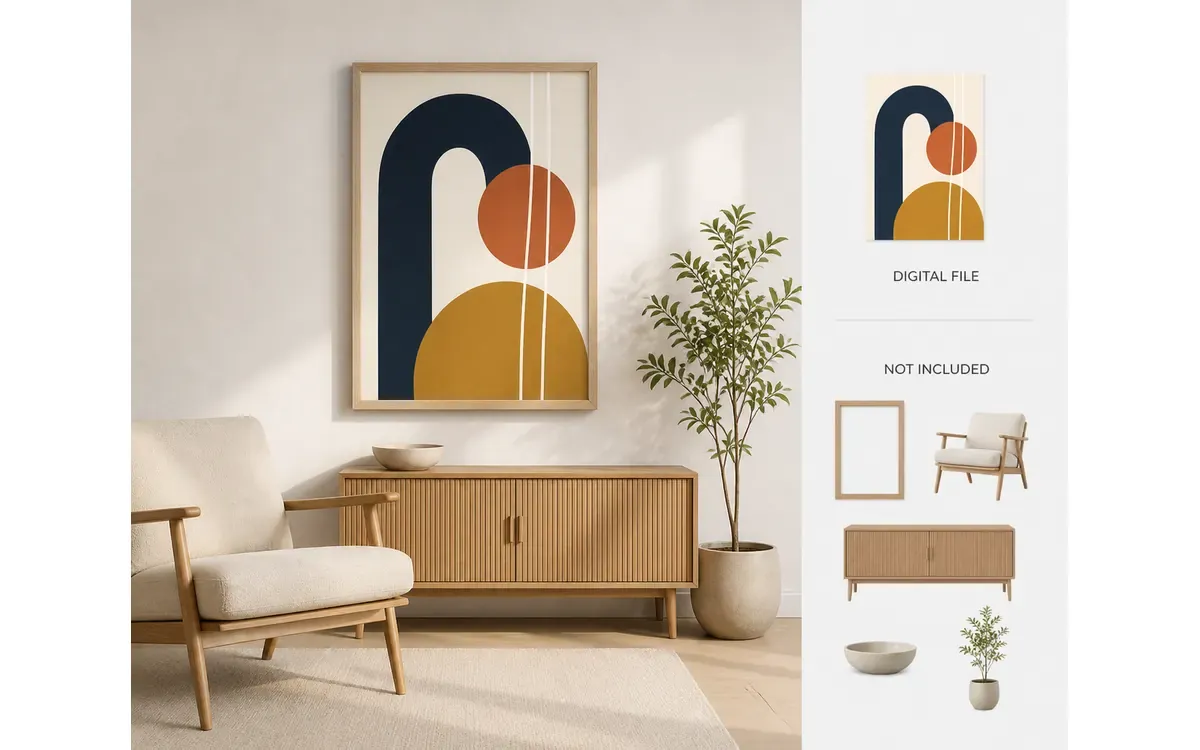
Mockups show buyers how the artwork will look when hung; however, the product type and delivery details must be explicitly stated separately.
II. How to Keep Digital Art Print Mockups from Distorting Proportions Due to Frame Changes
Aspect ratio refers to the relationship between a picture’s width and height. When the same artwork is placed in 2:3, 3:4, or 4:5 frames, it shouldn’t be forcibly squeezed by horizontal compression or vertical stretching. If cropping is necessary, create separate versions from the original composition and carefully check whether figures, text, edge patterns, and negative space remain intact.
Before starting scene creation, first establish a master template for the artwork: document its original orientation, allowable cropping boundaries, elements that must not be cut off, and the actual proportion sets provided. If only a single artwork is available, you canrefer to the target room’s composition and ambiance to craft a decorative scene mockup, but avoid replicating others’ works, branded furnishings, or protected designs.
During quality assurance, overlay the original artwork file with each mockup to compare them. Check whether circles have turned into ovals, facial features have been compressed, line spacing has changed, or if any unexpected elements have appeared in the corners of the image. Any deviation indicates not just “frame adaptation,” but rather changes made directly to the artwork itself.
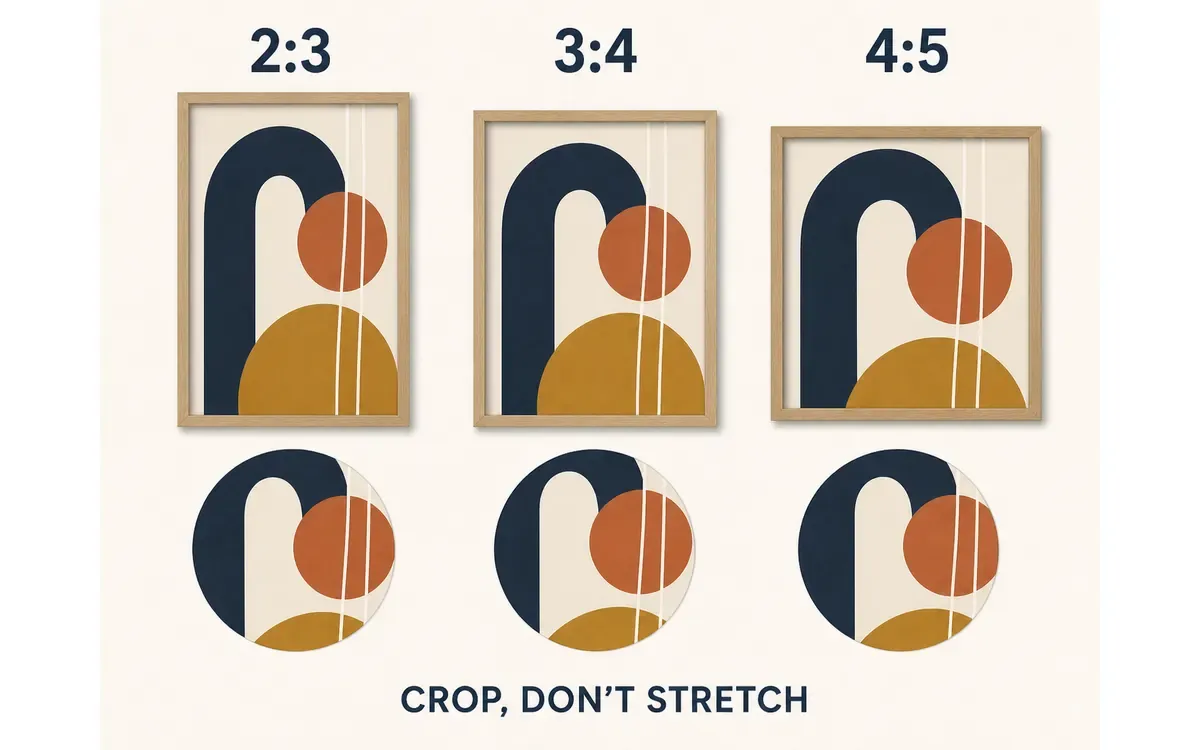
Different frames may allow adjustments to cropping ranges, but they must not alter the internal shape proportions of the artwork.
III. Wall scene images can help gauge size, but they cannot serve as size guides
The perceived size of a painting hung above a loveseat depends on factors such as the sofa’s width, shooting distance, and room perspective. Scene images are best suited for comparing “small accents” versus “large focal points”; precise dimensions should still be determined by specification charts.
Specification charts list only the sizes or aspect ratios actually supported by the current download package. Use a straight wall as a reference, aligning the outer outlines of various artworks on the same baseline; if both inches and centimeters appear, ensure the values come from the same approved table. Do not infer dimensions based on sofas, nightstands, or figures present in the rendered room.
If you wish to expand the same scene into landscape, square, or portrait formats for use as page assets, you canextend the wall canvas and reserve intact areas for the artwork across different orientations. What gets extended are the wall and furniture margins, while the artwork within the frame, the frame’s proportions, and the hanging height remain unchanged.
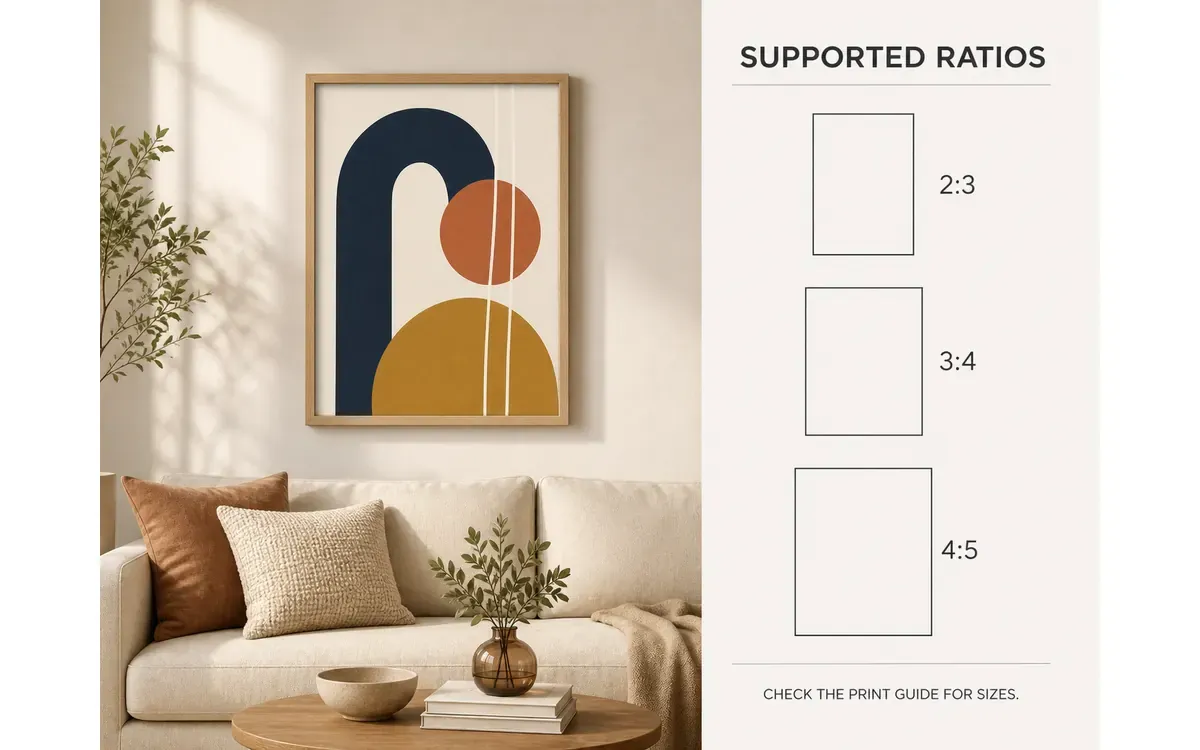
The room illustration provides a sense of volume, and the proportion table lists the supported aspect ratios; however, actual dimensions should still be verified according to the printing specifications.
IV. Instructions for Downloading Digital Artwork: Clearly list the files rather than cluttering the description with format names.
For Etsy’s instant‑download products, you must upload the exact files purchased by the buyer when creating the listing. Currently, the platform allows up to five digital files, each capped at 20 MB. File names are visible to buyers and cannot be renamed directly after uploading. Therefore, organize file names, ratio groups, and accompanying documentation before packaging.
The download instructions don’t need to include every technical detail. Buyers first need to know: how many ratio sets are included, what file type each set is, whether it’s packaged as a compressed file, how to find size references, and what physical items are not included. Color modes, print settings, and paper recommendations can be provided in the package’s accompanying documentation.
Use clear file names to distinguish between different ratios or orientations—avoid simply labeling them "final" or "final2."
Ensure that the number of files shown on the delivery image matches the actual content uploaded in the backend.
Separate preview images from printable files to avoid accidentally including framed mockups in the download package.
Clearly state that buyers receive digital files only, without guaranteeing consistent color results across printers, paper types, or monitors.
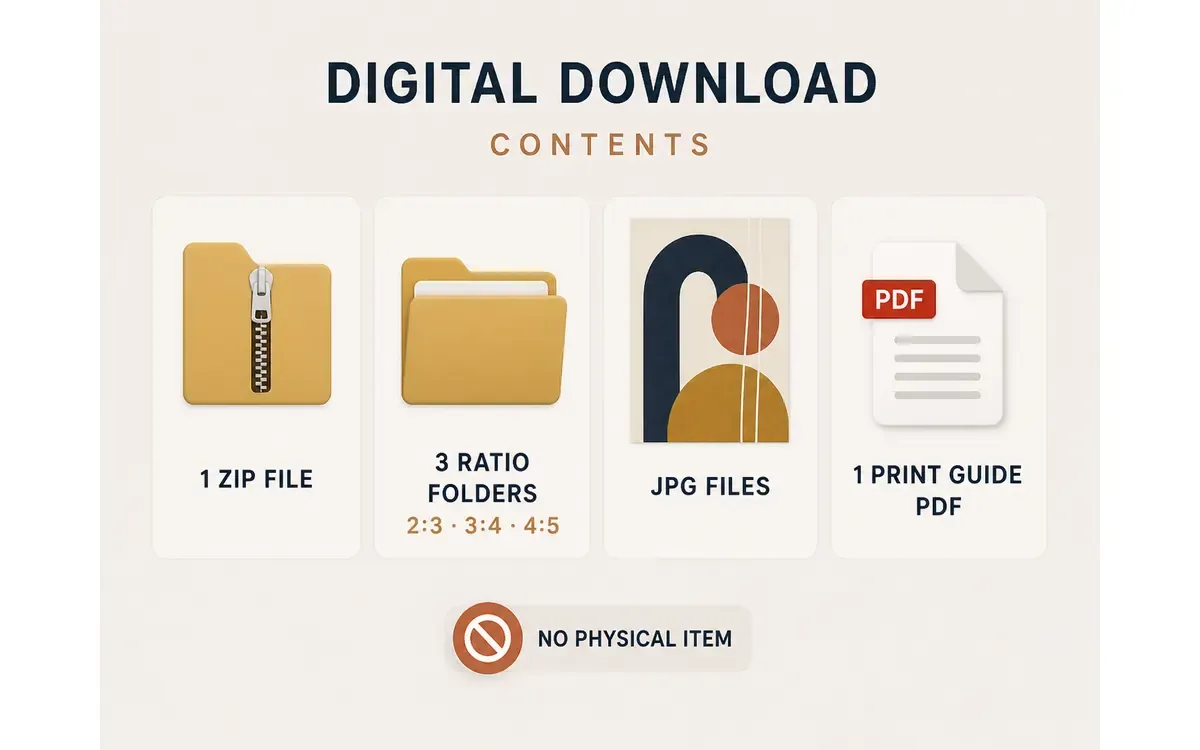
This diagram illustrates how to draft a delivery checklist; during official listing, the number of files, their ratios, and formats must exactly match the uploaded package in the backend item by item.
V. Arrange Etsy Digital Artwork Images According to the Buyer’s Reading Sequence
A well‑structured listing doesn’t require all images to follow the same template. Start with a clean scene to establish the style; move on to an explicit digital download notice; then showcase supported ratios and sizes; use the fourth and fifth images to illustrate application scenarios in different rooms; finally, include the file list, close-up details, and printing tips.
You can check the sequence using three key questions: Do buyers understand from the first three images that they’re purchasing a digital file rather than a physical frame? Can they easily identify their desired size? And do they know exactly what the download package contains? If the answers remain hidden until the final image, no matter how beautiful the earlier mockups appear, the product description remains incomplete.
Even if your artwork is correctly positioned within the scene, edge reflections, glass glare, or wall shadows may interfere with readability. In such cases, you can select specific areas like frame edges or wall shadows for localized retouching. If the artwork’s proportions, cropping, or file contents are incorrect, adjust the master version and the downloadable package first—don’t just tweak the preview image.
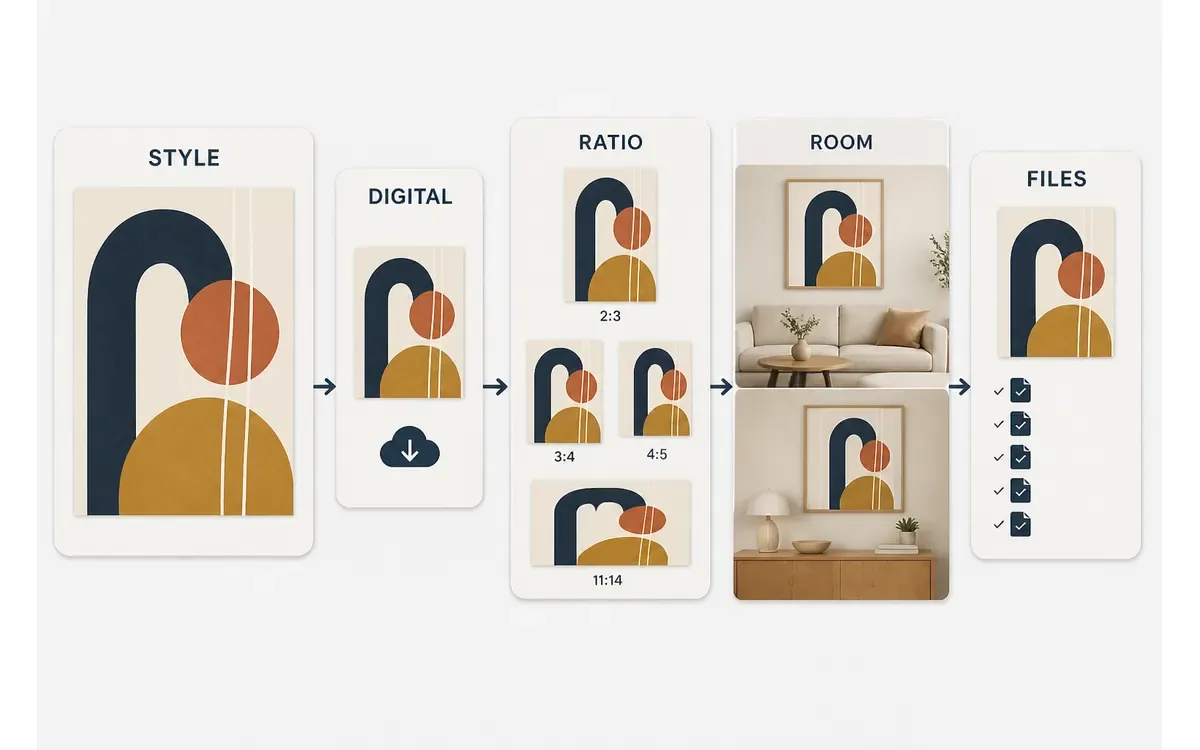
Arranging images in a sequence that progresses from “what it is,” to “how large it can be printed,” to “what the buyer will receive” makes the listing much easier to read than continuously stacking room‑based mockups.
VI. Common Questions About Etsy Digital Artwork Mockups
1. Can one piece of artwork, available in both landscape and portrait orientations, be listed under a single digital listing?
Yes, these versions can be included in the same download package, provided that both the images and the file list clearly indicate the presence of two orientations, and the actual files uploaded in the backend are identical. Etsy’s digital products do not support standard variations, so buyers cannot select landscape or portrait orientation after placing their order.
2. Should the paper texture shown in the mockup be included in the downloadable files?
Do not automatically bake display textures into the source files. Paper grain, canvas texture, and glass reflections are considered scene effects; they should only be incorporated into the downloadable files if the design itself explicitly includes such textures. Preview and delivery files must adhere to the same standards for verification.
3. Can the same room mockup be used across multiple decorative art listings?
While sharing the same room setup and lighting is acceptable, always replace the artwork accordingly and recheck frame proportions, cropping, and thumbnail centering each time. Avoid leaving traces of the previous piece’s edges, reflections, or colors in the new listing.

AI Image Tool Built for E-commerce Teams
For new product launches, advertising, and promotional campaigns, use AI to generate product images, scene visuals, ad creatives, and short video assets — making content production faster.